NEMT Entrepreneur provides expert insights, strategies, and resources to help non-emergency medical transportation professionals grow their businesses. Get industry-leading advice to succeed in NEMT.
Featured articles
If you want fewer missed renewals, faster audit response, and less file hunting, digital records usually beat paper. Both systems can meet NEMT rules, but they do not create the same day-to-day workload. And that gap matters when Medicaid claims, driver files, vehicle records, and HIPAA records all need to stay complete for at least 6 years - and in some states, up to 10 years.
Here’s the short version:
- I’d use digital records when I need fast file access, expiry alerts, audit logs, and tighter control over who can see PHI
- I’d use paper records only if the team is small, filing habits are strict, and someone checks every due date by hand
- I’d avoid relying on paper alone once the fleet grows, because even 5 drivers can take 5–10 admin hours per week
- I’d treat missing or late records as a direct money risk, since incomplete documentation drives about 35% of rejected Medicaid transportation claims
- I’d remember the date-of-service rule: if a document was missing on the day of the trip, adding it later may not fix the claim problem
What records are we talking about? In plain terms:
- Trip records: manifests, pickup/drop-off times, signatures, billing codes
- Driver files: license, MVR, background checks, drug tests, training records
- Vehicle files: registration, insurance, inspections, lift checks, maintenance logs
- Medical and ride approval records: PCS forms, prior auth, eligibility checks
- Admin and HIPAA records: BAAs, risk reviews, staff training, breach procedures
Quick Comparison
| Area | Digital | Paper |
|---|---|---|
| File access | Searchable in seconds | Manual file or box search |
| Renewal tracking | Alerts and dispatch blocks | Calendar or spreadsheet |
| Audit prep | Files can be pulled fast | Can take hours or days |
| Version control | Change history and timestamps | Old forms and edits are harder to track |
| Loss risk | Backups help prevent loss | Fire, water, theft, and misfiling risk |
| PHI control | Role-based access and MFA | Locked storage and strict handling rules |
| Fit by fleet size | Better for growth and multi-site teams | May fit very small teams |
My bottom line: paper can work, but it depends on human follow-through every single time. Digital puts more guardrails around renewals, audit prep, record retention, and access control. If the goal is to keep records complete, current, and easy to pull on demand, digital is usually the safer pick.
Below, I break down where each system works, where it breaks down, and what I’d look at before choosing one.
sbb-itb-cef70f4
Digital records: faster access, better tracking, and stronger audit readiness
A digital system helps your team move fast when an auditor calls. Instead of digging through paper binders, staff can pull a complete compliance file within 24 hours of an audit request. That kind of speed matters most during audits and renewals, especially when staff need to find, check, or renew records in a hurry.
File access, expiration alerts, and version control
Cloud-based storage gives multi-location teams remote access to the same records without sending attachments back and forth by email. Everyone works from the same file, which helps stop one team from using an older version while another team uses the latest one.
Automated expiration alerts are one of the biggest upsides of digital systems. Alerts for credentials like Medical Examiner's Certificates, MVR reviews, and CPR/BLS certifications keep deadlines in plain sight before they turn into a problem. Some platforms take it a step further with automatic trip blocking for expired credentials. If a required credential has lapsed, the system blocks that driver from getting trip assignments. That way, a non-compliant driver doesn't slip through just because a dispatcher is juggling ten things at once.
Digital records also show who opened or changed a file and when. Those timestamps are much easier to stand behind during an audit than paper records that can go missing, get damaged, or end up hard to read.
Once file access and version control are set up, the day-to-day work gets easier too.
Staff workflow and audit preparation
When records are organized and easy to search, compliance staff spend less time hunting down files and more time checking deadlines. For dispatchers and compliance teams, automation cuts manual follow-up and lowers the odds that an expired credential gets missed. Handling Driver Qualification Files by hand for a small fleet can eat up hours every week. Automation cuts that admin burden.
Standard file naming helps more than people think during audits. A format like YYYY-MM-DD_DocumentType_DriverLastName.pdf keeps records sortable and easy to search. If an auditor asks for a specific driver's CPR certification from 18 months ago, that file should show up in seconds, not after a long scramble. Role-based permissions add another layer of control. Drivers see only the pickup and drop-off details they need, while dispatchers and billing staff get access to the data tied to their roles. That setup keeps Protected Health Information limited to the people who need it, in line with HIPAA's minimum necessary standard.
Digital systems help protect compliance records by limiting access, tracking changes, and cutting the risk of missing files. To protect digital records, use encryption, multi-factor authentication, role-based access, and staff training.
Paper records: workable with strong discipline, but slower to manage
Paper records can meet NEMT rules, but they run on manual control. There’s no system watching deadlines in the background. Staff have to catch every due date, every update, and every missing form by hand. Paper trip logs are still legally allowed in all 50 states, but they must be legible to a reasonable person and stored in a way that makes them available within 30 days of an audit request. That only works when filing habits are tight.
Manual filing, renewal tracking, and document control
The main problem with paper is simple: nothing gets tracked on its own. Every expiring credential, every revised form, and every replaced SOP depends on someone remembering to do it. A practical first step is a no-dispatch rule: no driver leaves without a complete physical file.
For a small operation, a few basic tools can help:
- Standardized checklists
- A wall calendar and checklist
- A backup spreadsheet
That setup can keep things under control for a while. But once the fleet grows, the workload starts to pile up. Managing paper files for only five drivers can take 5–10 hours of administrative labor per week.
One rule trips up a lot of operators: the "no safe harbor" rule. Medicaid auditors use a date-of-service test. If a document was not in the file on the actual date of service, finding it later - or fixing it after an audit notice arrives - does not protect earlier claims.
Audit prep and physical record loss risk
When an auditor arrives, paper systems slow everything down. Someone has to pull boxes, sort folders, and check each file by hand. That takes time, and it leaves room for mistakes. One misfiled document or one out-of-date binder can lead to a missed record request inside the 30-day deadline, which can trigger suspension or termination.
The other big problem is physical loss. Paper records can be damaged by fire, flooding, theft, and wear. Manifests left in vehicles should stay in locked gloveboxes or secure pouches to protect PHI. After the retention period ends - up to 10 years for some trip records in states like Florida - disposal should be handled with cross-cut shredding. A destruction log should record the date, method, and who approved it.
| Drawback | Operational Impact | Financial Risk |
|---|---|---|
| Illegible entries | Claim treated as undocumented | 100% recoupment of payment |
| Misfiled documents | Failure to produce records within 30 days | Contract termination or suspension |
| Physical loss | Total loss of audit trail | Permanent loss of revenue for audited period |
Those tradeoffs stand out even more in the side-by-side comparison below.
Digital vs. paper for NEMT compliance: a side-by-side comparison
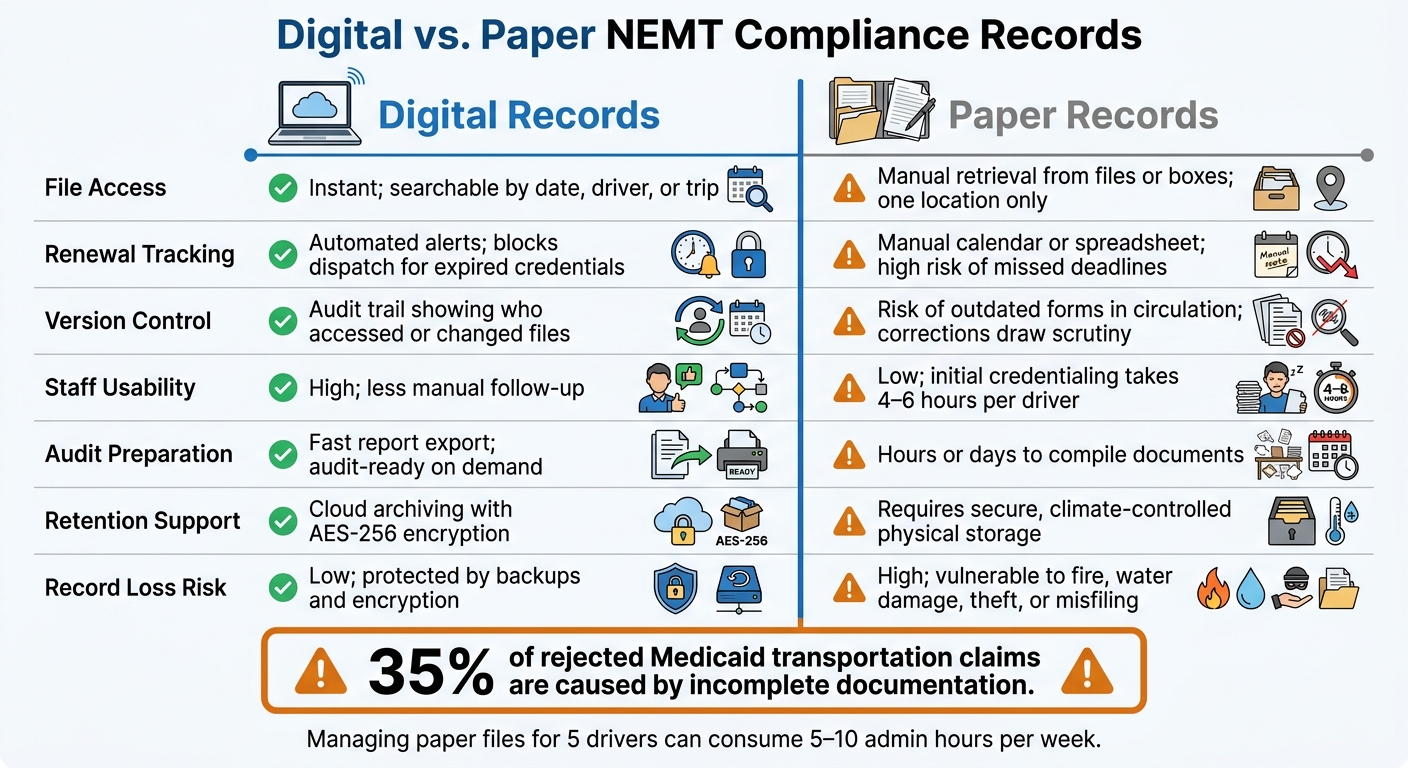
Digital vs Paper NEMT Compliance Records: Side-by-Side Comparison
Here’s the plain-English version: the best way to judge digital vs. paper is to look at the day-to-day compliance work side by side.
| Dimension | Digital Records | Paper Records |
|---|---|---|
| File Access | Instant; searchable by date, driver, or trip | Manual retrieval from files or boxes; limited to one location |
| Renewal Tracking | Automated alerts; blocks dispatch for expired credentials | Manual calendar or spreadsheet tracking; high risk of missed deadlines |
| Version Control | Audit trails showing who accessed or changed files | Risk of outdated or expired forms in circulation; corrections can look suspicious |
| Staff Usability | High; less manual follow-up | Low; initial credentialing can take 4–6 hours per driver |
| Audit Preparation | Fast report export; audit-ready on demand | Hours or days to compile documents |
| Retention Support | Cloud archiving with encryption for required retention periods | Requires secure, climate-controlled physical storage space |
| Record Loss Risk | Low; protected by backups and encryption | High; vulnerable to fire, water damage, theft, or misfiling |
Where digital records usually perform better
The biggest gap tends to show up during audit prep and renewal tracking.
With paper, teams often end up in what one industry source calls a "fire drill" - dropping normal work to hunt for missing signatures or proof of insurance the moment an auditor calls. Digital systems change that dynamic. Records can be exported in minutes instead of taking hours or even days to pull together.
Renewal tracking is another big dividing line. A digital dispatch system can stop a driver from getting trip assignments the moment a medical certificate or insurance policy expires. A wall calendar or spreadsheet can remind you to check, sure, but it can’t enforce anything on its own. And the cost of getting this wrong is not small: incomplete documentation accounts for approximately 35% of all rejected Medicaid transportation claims nationwide.
Version control is another pain point. Digital records keep an audit trail that shows who accessed, changed, or deleted a file and when. On paper, corrected forms and entries added later can draw extra scrutiny in an audit, even if the change was proper.
Where paper records may still fit some operators
Paper logs can still meet requirements if they’re legible and well organized. But they’re tougher to defend when an audit starts. For some operators, paper may still have a place in a hybrid setup, where trip-level data stays in an electronic system and original paper documents are scanned and archived right away.
The harder part is scale. Manual filing doesn’t hold up well as the team grows. Managing files by hand for 5 drivers can take 5–10 hours of admin time per week. That’s not just a workload issue. It also means more room for manual mistakes, missed renewals, and slower audit response as the fleet gets larger.
That sets up the next issue: which system can your team stick with consistently?
Choosing the right record system and building a defensible compliance process
Decision factors for owners, dispatchers, and compliance staff
After you compare features, the next move is simpler than it sounds: pick the system your operation can actually keep up with. The best setup isn't the one with the most bells and whistles. It's the one your team can keep complete, current, and ready when an auditor asks for records.
A good way to narrow the choice is to look at fleet size and audit pressure.
| Operator Profile | Recommended System | Primary Reason |
|---|---|---|
| Solo Operator (1–2 vans) | Paper or Basic Digital | Lower overhead, but high risk of human error |
| Mid-Sized (5–15 vans) | Digital (Software-based) | ROI from admin time savings (90–180 min/day) |
| Large/Multi-Site (15+ vans) | Enterprise digital system | Essential for centralized oversight and audit defense |
| High-Audit States (NY, FL, CA) | Digital with EVV | Mandatory state EVV requirements and longer retention periods |
Physical files spread across cabinets, offices, or sites can drag an audit down fast. A centralized digital setup solves that problem by putting records in one place.
Retention rules make this choice even more important. Federal Medicaid rules require records to be kept for at least 6 years, but many operators use 7 years as the safer target to cover audit windows. Florida and Texas require 10 years for some records, including EVV data.
For paper systems, that means secure, climate-controlled storage. For digital systems, it means AES-256 encryption and an executed Business Associate Agreement (BAA) with your cloud provider.
A lot of operators don't go all-in on one side or the other. They use a hybrid setup instead. For example:
- Use digital software for trip records
- Scan source documents into one file system
- Keep a destruction log with the date, method, and approver
Access controls matter too. Role-based access control (RBAC) limits who can see what based on job role, which helps protect PHI.
Conclusion: control and access decide compliance strength
Both digital and paper records can meet NEMT compliance rules. But once an audit starts - or a renewal date slips by - the difference between the two gets a lot more obvious.
Digital systems give teams faster file access, automatic renewal alerts, and audit reports that can be pulled in minutes instead of days . Paper can still work, but it takes tighter manual controls, more admin time, and stronger physical safeguards to stay defensible.
Pick the system your team can keep complete, accessible, and current.
FAQs
When should a small NEMT operator switch from paper to digital records?
Small NEMT operators should switch to digital records before the first trip goes out. Getting an automated documentation system in place early can help you avoid compliance problems and day-to-day pressure once trip volume starts to climb.
Some providers still use a hybrid setup for original documents, like vehicle inspections. But digital trip logs make audits easier to handle, cut down on manual mistakes, and reduce the chance of losing records.
Can a hybrid paper-and-digital system still meet NEMT compliance rules?
Yes. A hybrid system can meet compliance requirements, but only if you manage it tightly.
Scanned paper records need to be clear, complete, and easy to read. They also need to live in a secure digital system that meets compliance rules. Paper originals should be destroyed only after the scan has been checked and confirmed. When that happens, keep a destruction log so there’s a record of what was destroyed and when.
No matter which format you use, records must be available right away during an audit. They also need strong protection, such as encryption and role-based access. And both paper and digital records must be kept for the full state and federal retention period.
What records cause the biggest audit or claim problems when missing?
The biggest problems usually start with missing or incomplete trip records. The most common trouble spots are unsigned manifests, missing or mismatched timestamps, and mileage that can't be backed up with GPS data. Missing patient signatures or authorization details can also lead to claim denials and failed audits.
Driver qualification files can cause just as much trouble when they're out of date or only partly filled out. The same goes for vehicle maintenance and inspection logs. If those records aren't current and complete, you're not just dealing with audit risk - you could also put your operating license on the line.