The operator's publication for non-emergency medical transportation. State licensing guides, broker intel, a 2,000+ provider directory and The Dispatch, our weekly newsletter.
If I were launching an NEMT startup today, I’d treat EHR connectivity as a revenue and trust issue, not just an IT project. Manual trip entry can drive claim rejections to about 15%, while connected NEMT workflows can cut no-shows by up to 20% and trim booking errors by 45%.
Here’s the short version:
- Start with risk and access: get the BAA, security controls, and insurance in place first.
- Keep the first build small: focus on discharge-to-trip creation before adding write-back and extra workflows.
- Use the right data standards: HL7 v2 for ADT events and FHIR R4 for patient, order, appointment, location, and coverage data.
- Pick the setup that fits your stage: for many early startups, middleware is the better path on cost, timeline, and multi-EHR support.
- Plan for bad data and outages: duplicates, missing mobility data, ID mismatches, and feed downtime need manual fallback rules.
- Train by role: dispatch, drivers, clinic staff, and support teams each need sandbox practice tied to their daily tasks.
- Measure results fast: target 80% to 90% of facility trips auto-created from the EHR, 70% to 90% less re-typing, <5% claim rejection, and >95% on-time discharge pickups.
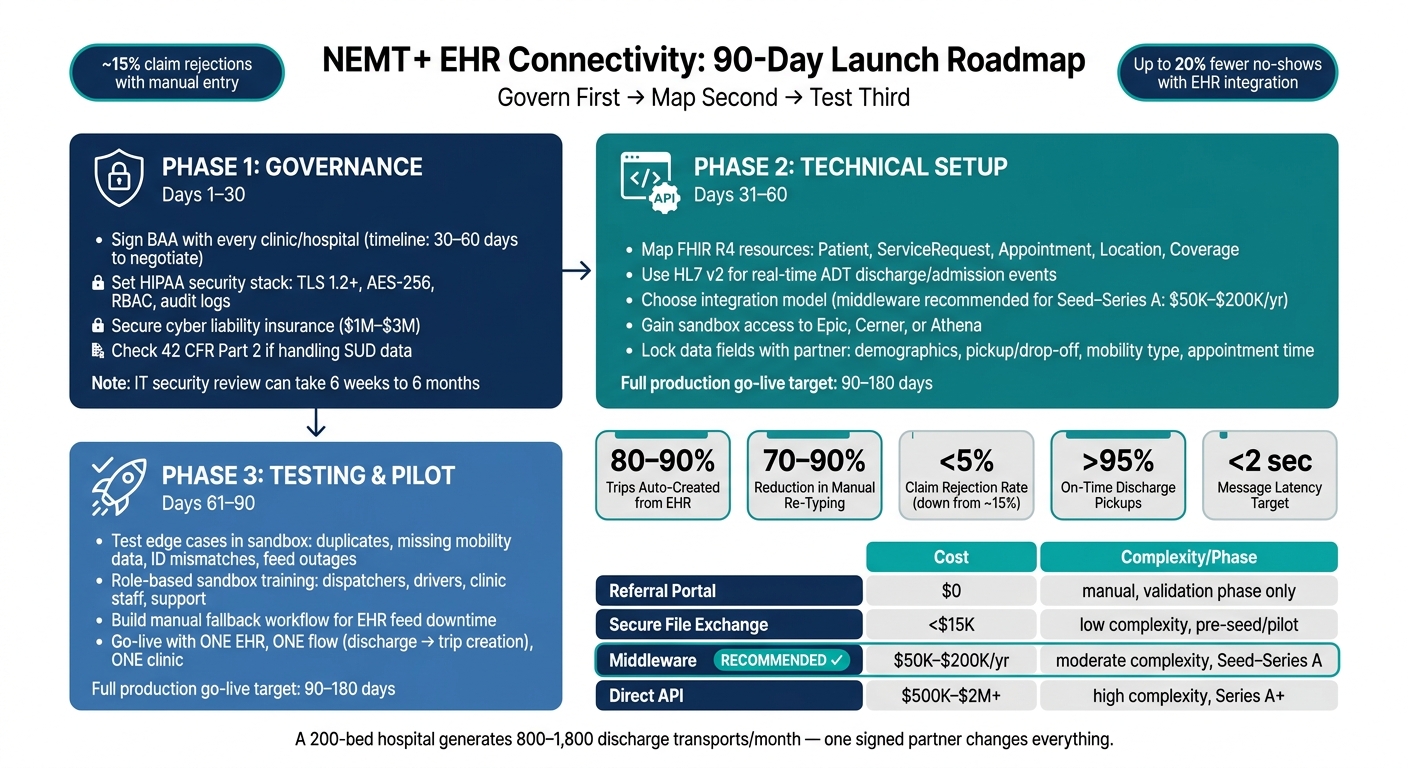
A few numbers matter early. BAAs often take 30 to 60 days. IT security review can take 6 weeks to 6 months. Full production go-live often lands in the 90 to 180 day range. And a 200-bed hospital may generate 800 to 1,800 discharge transports per month, so even one signed partner can change your staffing and support needs fast.
If I had to boil the whole article down to one line, it would be this: govern first, map second, test third.
NEMT EHR Integration Roadmap: 90-Day Launch Plan for Startups
Crafting Your EHR Integration Strategy
sbb-itb-cef70f4
Quick comparison
| Area | What I’d do first | Why it matters |
|---|---|---|
| Compliance | Sign BAA, set HIPAA controls, check 42 CFR Part 2 needs | Hospitals usually won’t move without it |
| Data standards | Use HL7 v2 + FHIR R4 | Covers event triggers and structured data |
| First rollout | One EHR, one flow, one clinic | Cuts scope and lowers failure risk |
| Integration model | Start with middleware | Lower build burden and better multi-EHR coverage |
| Intake design | Auto-fill only the fields dispatch needs | Cuts re-typing and wrong-vehicle risk |
| Exception handling | Build rules for duplicates, bad IDs, and missing fields | Stops bad requests from hitting dispatch |
| Go-live prep | Sandbox training + fallback workflow | Helps staff handle issues on day one |
| Success metrics | Track auto-created trips, latency, uptime, and denials | Shows if the connection is working in daily use |
So if you’re reading this as a founder, my take is simple: don’t try to connect everything at once. Build a narrow first use case, prove it works, and make the second clinic a setup job instead of an engineering job.
Build the Foundation: Compliance, Standards, and Startup Planning
That kind of efficiency only pays off when the legal, security, and data rules are handled first.
HIPAA, BAAs, and the Minimum Security Setup
Before you start any integration work, you need a signed Business Associate Agreement (BAA) with every clinic or hospital you want to connect to. Hospitals will not move forward without it.
You also need the basic security stack in place: TLS 1.2+ for data in transit, AES-256 for data at rest, RBAC, audit logs, and incident response procedures. That’s the floor, not the ceiling.
In many cases, hospitals also ask for outside security validation, such as SOC 2 Type II or HITRUST certification. That step can slow down launch timelines. And if you handle data from federally assisted substance use disorder (SUD) programs, 42 CFR Part 2 brings tighter confidentiality rules than standard HIPAA.
Insurance matters too. Before go-live, increase cyber liability coverage and add technology E&O.
Once access and security are approved, the next job is to lock in the data standard.
HL7 v2, FHIR R4, and the Data Fields NEMT Needs
Use HL7 v2 for real-time discharge and admission events, and use FHIR R4 for structured data from certified EHRs.
The FHIR resources that matter most for NEMT are:
- Patient for demographics
- ServiceRequest for the transport order
- Appointment for visit details
- Location for pickup and drop-off addresses
- Coverage for insurance and prior-authorization status
Use ServiceRequest as the transport order record.
At the start, keep the data model tight. Focus on the appointment date, appointment time, pickup and drop-off addresses, and mobility type.
After that, you can map out the rollout without building too much too soon.
Create a Phased Connectivity Roadmap
A phased rollout helps control risk and cost. This is also where budget planning starts, because startups can’t scope integration work well until security and data standards are set.
| Phase | Capability | Data Standards Used |
|---|---|---|
| Phase 1: Import | Auto-import patient demographics, pickup/drop-off, and mobility needs | FHIR Patient, Location, Appointment |
| Phase 2: Status Updates | Push trip status (En Route, Picked Up, Dropped Off) back to the EHR | FHIR Task or ServiceRequest status |
| Phase 3: Real-Time Triggers | Ride requests triggered automatically by discharge events | HL7 v2 ADT or FHIR Subscriptions |
One more thing: don’t start build work until the discharge contract is signed. A 200-bed hospital can generate 800 to 1,800 discharge transports a month. That gives you a working baseline for staffing and support planning.
Your budget should cover interface setup, security review, and ongoing maintenance. Add 30% for project management and security review, and expect to spend 15% to 20% of the initial build cost each year on maintenance and monitoring.
With legal, security, and data standards set, the next move is picking the integration model and vendor.
Choose the Right Integration Approach and Partners
With your security rules and data standards in place, the next step is picking an integration model that matches your launch plan.
Direct API Connection vs. Middleware
Your integration model affects three things right away: timeline, budget, and how many partners you can support. There are four main paths, but for most early-stage NEMT startups, middleware is the practical default.
| Approach | Technical Complexity | Cost (USD) | Scalability | Multi-EHR Support | Maintenance Burden | Best Fit |
|---|---|---|---|---|---|---|
| Direct API | High | $500k to $2M+ | High | Low (build per EHR) | High | Series A+ with deep needs |
| Middleware | Moderate | $50k to $200k/yr | High | High | Low | Seed to Series A |
| Secure File Exchange | Low | <$15k | Low | Moderate | Moderate | Pre-seed or pilot phase |
| Referral Portal | Very Low | $0 (manual) | Zero | N/A | Very High (manual) | Validation phase only |
A direct API connection gives you more control, but it also means more build work, more upkeep, and usually a bigger team. Secure file exchange is cheaper and simpler, though it won't take you very far if volume starts climbing. A referral portal can work for early validation, but it's manual by nature, so it doesn't scale.
That leaves middleware in the middle in a good way. It usually gives seed to Series A startups the best balance of cost, speed, and multi-EHR support. And once you choose that path, your vendor review process and testing plan become much clearer.
How to Review Platforms and Integration Vendors
Before you sign anything, ask the vendor to show a live API call against a real broker or EHR, not just a sandbox demo. A polished walkthrough can look great and still tell you very little about how the system behaves in production.
You also want direct answers on two points:
- How the vendor handles API changes
- Whether the SLA covers breakage when those changes happen
Then use the vendor's sandbox to test edge cases before you ask for live access. That's where problems tend to show up: missing fields, bad timestamps, duplicate records, odd discharge scenarios, and data that doesn't map cleanly.
The table below shows what to verify before you commit.
| Criteria | What to Require |
|---|---|
| Standards Support | FHIR R4 (US Core 6.1.0) and HL7 v2 for ADT feeds |
| EHR Coverage | Must include Epic, Cerner (Oracle Health), and Athena |
| Sandbox Access | Immediate access to synthetic patient data for testing |
| Timeline | 90 to 180 days for full production go-live |
| Data Ownership | Your startup owns the data logs; vendor must sign a BAA |
| SLA | 99.9% uptime; response within 24 hours for API breaking changes |
That last point matters more than it may seem. If an API changes and your dispatch flow breaks on a Friday afternoon, vague support language won't help much.
How to Talk with Clinics and Hospitals About Connectivity
Bring the right people in early: the case manager, IT director, compliance officer, and billing manager. Start with shared operating goals, not technical jargon. That tends to make the conversation move faster.
A 200-bed hospital generates 800 to 1,800 discharge transports per month. So even a small improvement in referral flow, trip creation, or handoff speed can have a clear impact.
Once the discussion turns to data sharing, lock down the exact data fields during scoping. That helps limit PHI and keeps scope creep from sneaking in. It also saves everyone from the classic “while we’re at it” spiral that drags projects out.
Before any build work starts, get specific about partner expectations. Agree on:
- Trip creation time
- Escalation paths when the integration fails
- Who owns the connection when the hospital upgrades its EHR
This part often takes longer than founders expect. BAA negotiations usually take 30 to 60 days, and IT security reviews can run from 6 weeks to 6 months. Build that into your project timeline from day one.
Once the partner and data model are set, design intake and dispatch workflows around them.
Design Intake and Map Daily Workflows Around EHR Data
With partners and integration rules in place, attention moves to day-to-day work: what the form collects, how dispatch uses that information, and how status updates flow back.
Build Intake Forms That Match EHR Data
After you choose the integration model, the next step is making sure the intake form lines up with the data already stored in the EHR.
The goal is simple: staff should check data, not type it all over again. Only map the fields dispatch needs, like demographics, pickup and drop-off locations, appointment time, transport order, insurance, and mobility type.
Keep free-text fields to a minimum. Mobility needs especially should use structured options such as ambulatory, wheelchair, stretcher, and bariatric. That small choice can help prevent sending the wrong vehicle.
EHR-driven intake cuts mistakes and saves time. Automated scheduling systems can reduce booking errors by 45% and cut patient wait times by 30%. When intake is messy, the damage spreads fast: rework, denials, and delayed pickups all follow.
| Feature | Manual Intake | EHR-Driven Intake |
|---|---|---|
| Speed | Minutes (manual re-typing) | Seconds (auto-fill via API) |
| Accuracy | High risk of typos and errors | High (structured data from source) |
| Staff Workload | High (duplicate data entry) | Low (exception management only) |
| Error Rates | ~15% claim rejection rate | Significantly lower via auto-verification |
| Compliance | Manual paper/portal trail | Automated, time-stamped audit trail |
Use FHIR-based prior-authorization APIs to check coverage before the trip runs. That way, expired authorization gets caught before dispatch touches the trip.
Map End-to-End Workflows Before and After Go-Live
Once intake fields are mapped, trace every handoff from request creation to EHR write-back.
Before go-live, document each handoff point: how a request enters the system, who confirms it, how the driver is notified, and how completion data returns to the chart. Sending trip status updates like driver assigned, en route, picked up, and arrived back into the patient’s EHR chart gives care teams real-time visibility without a single phone call.
Use event-driven updates for discharges and cancellations so dispatch stays in sync with the chart.
| Workflow Scenario | EHR Trigger | NEMT Action | Required Data | Risk Point |
|---|---|---|---|---|
| New Discharge | ADT Message / ServiceRequest | Auto-create trip, assign fleet | Mobility needs, destination, auth status | Missing mobility data |
| Appointment Change | Appointment (FHIR) Update | Reschedule trip in dispatch | New time/date, provider location | Polling lag |
| Cancellation | Encounter Status: Cancelled | Cancel driver, notify dispatch | Patient ID, original Trip ID | Late cancellation |
| Trip Completion | NEMT system trigger | Write-back to EHR chart | Arrival time, mileage, driver ID | Firewall blocks write-back |
| No-Show | Driver trigger | Update EHR status to "No-Show" | Reason code, timestamp | Care team misses no-show |
Map these scenarios before go-live, not in the middle of it. It’s much better to spot cancellation gaps early than to scramble once trips are already moving.
Handle Edge Cases That Break Automation
After the main workflow is mapped, decide what happens when the feed is wrong, late, or missing key data.
Automation handles routine cases well. The trouble usually starts at the edges, and that’s where your team needs clear rules.
Duplicate ADT messages can create duplicate ride requests if the system does not handle events idempotently. Build the integration so duplicate events are caught and dropped before they hit dispatch.
Mismatched patient identifiers call for a normalization layer in your middleware, especially when translating data from more than one EHR. Missing mobility information is another common problem. If the ServiceRequest does not say whether the patient is wheelchair or ambulatory, flag the trip for manual review instead of sending the wrong vehicle.
Route exceptions to dispatch right away, with alerts for duplicates, late cancellations, and missing fields.
Have a manual fallback ready before you need it. If the EHR feed goes down, staff should follow a documented process, such as a secure portal or fax protocol. Retry queues also help keep trips from disappearing during outages.
"The coordinator shifts from data entry to exception handling." - Mindbowser
Once the workflow is stable, train the team on exception handling and support before go-live.
Train Staff, Support Go-Live, and Scale the Program
Once the workflow is mapped, the next step is simple in theory and messy in practice: train people for their actual jobs, support them during launch, and watch performance closely.
Train Dispatchers, Drivers, and Partner Users by Role
Train each role on the work it will do at go-live. That’s what makes the difference between a smooth launch and a scramble.
Dispatchers should learn how to use dashboards, respond to failed messages, and manage documented exceptions. On day one, a one-page cheat sheet for common alerts can save a lot of time.
Drivers need hands-on practice with the mobile workflow, especially geofencing and automated timestamps. They should also understand that every status tap updates the EHR. That bigger-picture link helps the process stick.
Clinic users need a short, focused walkthrough of the full workflow: how to request a ride through the EHR-integrated portal and how to view real-time ETAs inside the patient’s record to cut discharge delays. Keep it tight. They usually only need those two tasks.
Call center or support staff should know who owns what internally and when to escalate to the vendor for API disruptions or data mapping errors.
Sandbox environments, such as Epic App Orchard or a Cerner sandbox, give staff a safe place to practice discharge-triggered ride requests. That kind of practice is often the difference between “I saw the demo” and “I can do this on my own.”
| Training Method | Adoption Rate | Error Rates | Staff Satisfaction |
|---|---|---|---|
| Lecture-Only | Low | High | Low |
| Scenario-Based (Sandbox) | High | Low | High |
| Ongoing Coaching | Very High | Lowest | Very High |
Use regular partner check-ins to spot reliability issues early.
Once each role can handle its tasks in sandbox, assign support ownership before go-live.
Set Up Support and Monitor Integration Health
Before go-live, confirm the BAA and IT review are complete. Assign one internal Integration Lead to handle hospital IT communication, set clear escalation steps for technical failures, match support hours to clinic hours, and include an SLA in your vendor contract for API changes so updates don’t break the workflow.
For monitoring, track message failures, latency, system uptime, and subscription health on one central dashboard. Add automated alerts for authentication failures, message queue depth, and EHR maintenance windows so your team hears about problems before the clinic does.
After launch, use uptime and error rates to judge whether the integration is ready for the next facility.
Measure Results and Plan Early Growth
After 30 days, measure the numbers that show whether the integration is doing its job.
| Metric | Target | Data Source |
|---|---|---|
| Trips Auto-Created from EHR | 80 to 90% of total facility trips | EHR ServiceRequest logs |
| Manual Entry Reduction | 70 to 90% reduction in re-typing | Dispatcher workflow audit |
| Claim Rejection Rate | <5% (down from ~15% baseline) | Billing/EDI 835 files |
| On-Time Performance | >95% for discharge pickups | GPS/telematics data |
| Message Latency | <2 seconds | Integration dashboard |
| Onboarding Velocity | <4 weeks per new facility | Project tracking |
If you can onboard a second clinic in 1 to 2 weeks without engineering help, you’re ready to scale. At that stage, the customer success team should be able to configure new connections without engineering involvement.
For multi-state growth, automate state-specific billing rules.
Conclusion: Key Steps for a Practical EHR Connectivity Rollout
After workflow design, training, and support are in place, rollout success comes down to sequence.
EHR connectivity tends to work step by step. If you get governance, data mapping, and pilot testing right, each new clinic becomes much easier to bring on. The playbook should stay the same every time: govern first, map second, test third.
What to Prioritize in the First 90 Days
| Timeframe | Focus | Key Deliverables |
|---|---|---|
| Days 1 to 30 | Governance | Signed BAA, hospital discharge contract, cyber liability insurance ($1M to $3M) |
| Days 31 to 60 | Technical Setup | Security review, FHIR R4 data mapping, sandbox access |
| Days 61 to 90 | Testing & Pilot | Fallback workflow testing, role-based staff training, KPI definition |
Once those three stages are done, measure readiness by operational consistency, not by how fast you can go live.
Keep the first rollout narrow. Start with one EHR and one flow: discharge to request. Add trip-status write-back and more partners only after that setup is working well. Set launch metrics early so you have a clear read on system stability. Claim acceptance rates, on-time trip percentages, and message failure rates show whether the rollout is holding up in day-to-day use.
How to Know You Are Ready to Scale
You are ready to scale when adding a clinic becomes a configuration task, not an engineering project. A new site should take 1 to 2 weeks to configure.
A good gut check is simple: the process should repeat cleanly. Message failures should stay low, onboarding should run the same way each time, and staff should use the workflow the same way across sites. Support also needs to be in place, including dashboards, incident response, and automated health checks.
FAQs
What should I connect first?
Before you connect to an EHR, get a signed hospital discharge contract in place first. If you build the integration before the contract is signed, you can burn time and money fast. It’s one of the most common financial mistakes teams make.
Once that contract is done, begin with the clinical partners you work with most often. From there, set up standard data-sharing workflows so the process stays consistent instead of turning into a case-by-case scramble.
Keep the data scope tight at the start. Focus on the basics:
- Patient identifiers
- Appointment details
- Pickup and drop-off locations
- Mobility needs
Do I need middleware or direct APIs?
It depends on your technical resources and how you plan to scale.
Choose direct APIs if your product needs deep, high-performance connections or write-back workflows with specific EHRs like Epic or Oracle Health.
Choose middleware if you want faster, broader connectivity across multiple EHRs without building each integration from scratch.
A lot of NEMT startups end up using a hybrid model: middleware for quick onboarding, and direct APIs for mission-critical, high-volume exchanges.
How do I handle EHR outages?
Use middleware with durable queues so data isn’t lost during outages or connection drops. Add retry logic so requests resend on their own when service comes back.
Also use idempotency controls to stop duplicate messages from creating duplicate ride bookings. NEMT Entrepreneur offers more guidance on keeping these workflows steady and reliable during external system failures.